One of the first things I discovered when I began photography in earnest was presets in Lightroom. They allowed me to experiment with different looks and moods and learn a lot about the different functions and features of Lightroom by trial and error. You click a preset, slide that bar a little this way, a little that way, and voila! A whole new image! Pretty Presets was one of the first preset creators I found and has proved to be one of my favorites. No matter what your style, I bet you could find a preset that fits with your editing aesthetic. I am never happy with just a preset though. Even with a beautiful template, I always make a few tweaks to make the photos exactly what I want it to be.
With this post, I want to show you how I typically use presets to edit my photos with Pretty Preset’s Pretty Film Pastels Collection.


Here are all of the presets represented over one photo [none edited any further than just adding the preset]. Hover over the photo and you’ll see the name of the preset I used. You can see what a variety of moods, detail, light, and shadow is available in this one collection alone. So many choices!!! When I first started using presets, I would click through an entire collection every time I had a photo to edit to see which I liked best for that particular shoot. However, over time, I have found that I gravitate towards one or two presets that fit my general editing aesthetic or the feel I want for my Instagram feed. As you use all the presets, you’ll find the two or three that work best for you as well.
Sometimes though, I’ll go wild and use a totally new to me preset. My photography subjects range from every day life for my blog and Instagram feed to highly stylized shoots for clothing brands. The edits that I want for the lifestyle type shots are absolutely NOT the same as the those I want for more creative, magical shoots. The photos I’m sharing with you for this post were closer to the latter, for Pippa & Penelope, a fabulous little handmade shop for girl’s dresses. I wanted some whimsey and a preset that really emphasized the light coming in through the trees. My process went something like this:
- I found a shot I LOVED and applied every preset to it (see the above grid).
- Then I sat back and identified about 5 that really stood out to me.
Here is what I landed on.
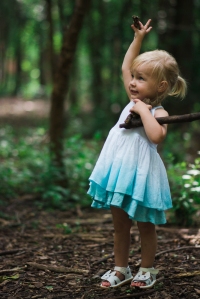
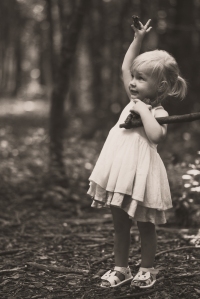
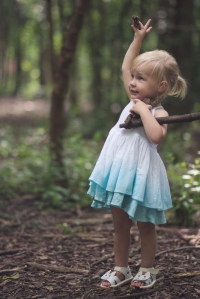
Bashful. Barnwood. Citrus Blossom.
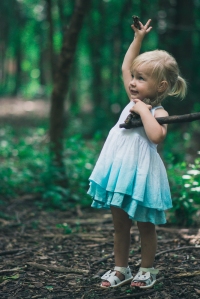
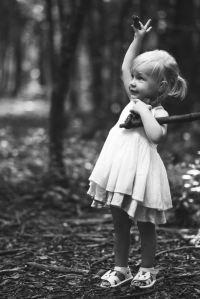
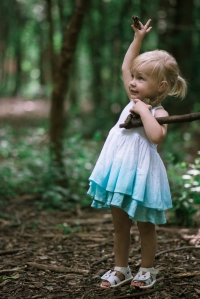
Mountain Stream. Nightingale. Pastel Film II.
You can see how each preset brings out a certain aspect of the photo. Blues are highlighted in Bashful and Mountain Stream. The black and white of Nightingale is crisp and bright while the Barnwood is much more vintage. My taste these days is more moody, matte, a neutral and Citrus Blossom and Pastel Film II both hit that. I like the tones of Pastel Film II a bit more, so I decided to work some edits using that preset.


The Pastel Presets Collection also has some Film Toolkit presets to help with tweaks if you’re not comfortable yet messing around with all of Lightroom’s options. They make it easy to slightly adjust your photos. Hover over the photos above to see the toolkit preset I added to the Pastel Film II to create a slight difference in tone. You can combine any of these to get the total look you’re going for.


For the one on the left, I increased the contrast level to create more of a moody feel. The photo on the right was just brightened a touch, but pretty much reflects the Pastel Film II preset as is.


A few more of my favorite images with Pastel Film II.


And a few more favorites with Aphrodite, another favorite preset with a little deeper saturation level.
I’m hoping this encourages you to try out a preset collection! I have more fun flipping through different preset options to create fun and unique edits for my shots and it’s so easy!
Disclaimer: Pretty Presets provided the author with the Pastel Film Collection to use, but my opinions and statements are truly all my own.
 Pretty Penny Photography